
Marketing


Mykyta Hryhorenko
CEO & Co-founder
The Problem With Most Conversion Tracking
Most businesses running paid ads believe their conversion data is accurate. It isn't. Misconfigured tracking is one of the most common issues across ad accounts, and it's particularly damaging because it's invisible. The dashboard looks fine. The numbers come in. Decisions get made. And the entire time, the data driving those decisions is either inflated, incomplete, or tracking the wrong thing entirely.
The consequences are predictable. Campaigns that look profitable get scaled — sometimes into losses. Campaigns that are actually generating revenue get cut because the conversions aren't being attributed correctly. Bidding strategies optimise toward events that don't reflect real business outcomes. When performance drops, the instinct is to blame the platform or the creative, when the real problem is that the algorithm has been learning from bad signals from the start.
The Two Ways Tracking Fails
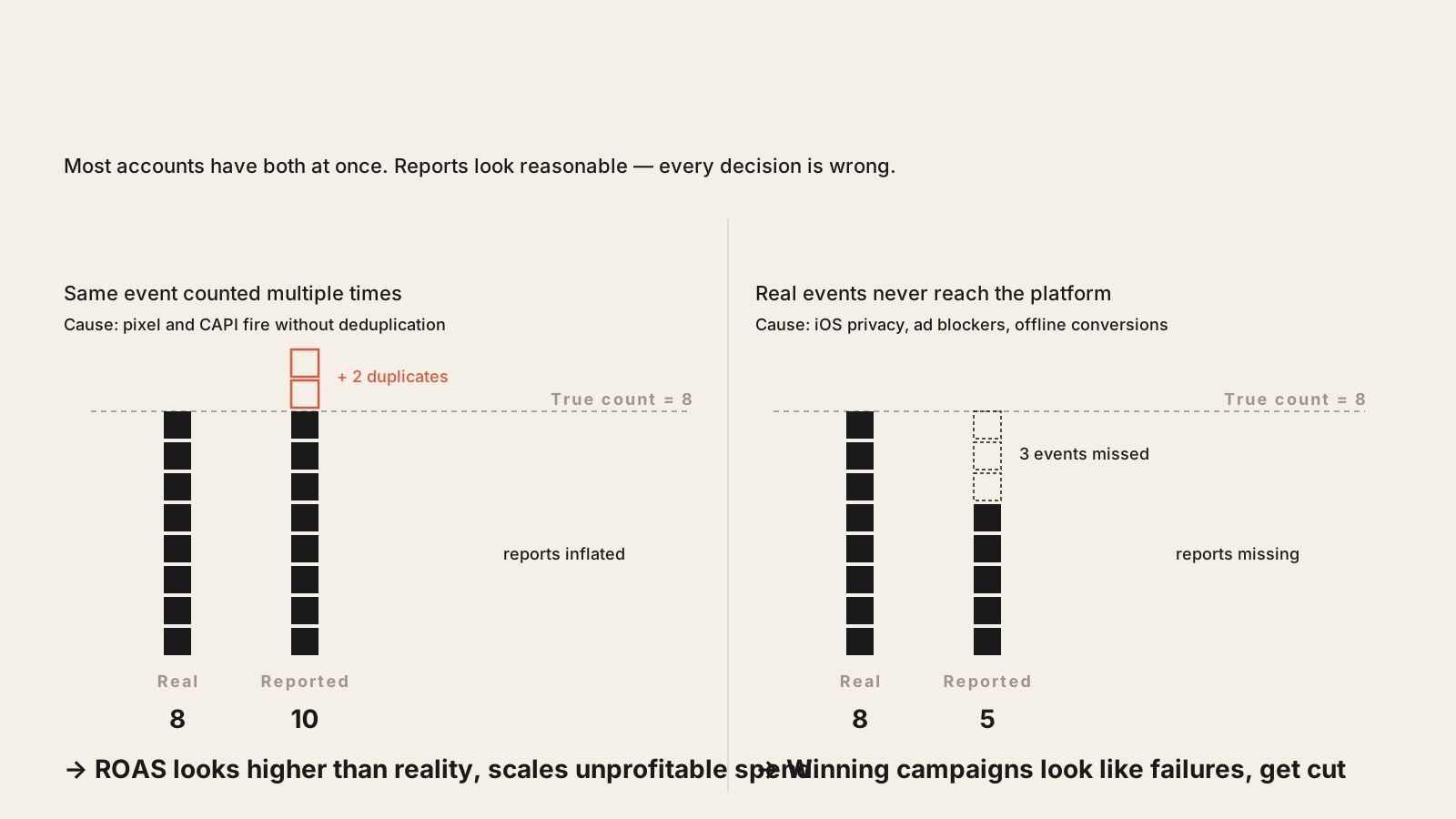
There are two failure modes, and they produce opposite symptoms. Overcounting happens when the same conversion gets recorded multiple times. The most common cause is firing the same event from both the browser pixel and a server-side integration without deduplication. A user submits a form, the pixel fires on the thank-you page, the CRM also sends a conversion event via API — and the platform counts two conversions for one lead. CPL looks artificially low. ROAS looks better than it is. Scaling decisions are made based on performance that doesn't exist.
Undercounting is the opposite and arguably more damaging. Phone calls that come in through ad traffic but aren't tracked. Leads who submit on mobile but whose conversion doesn't fire because of an iOS privacy restriction. Offline sales that never get fed back into the platform. The campaigns driving these invisible results look like they're failing, get cut, and the business wonders why lead volume drops.
Both problems exist simultaneously in most accounts. The net effect is a data picture that's skewed in ways that are hard to detect without specifically looking for them.
Pixel + CAPI: Why You Need Both
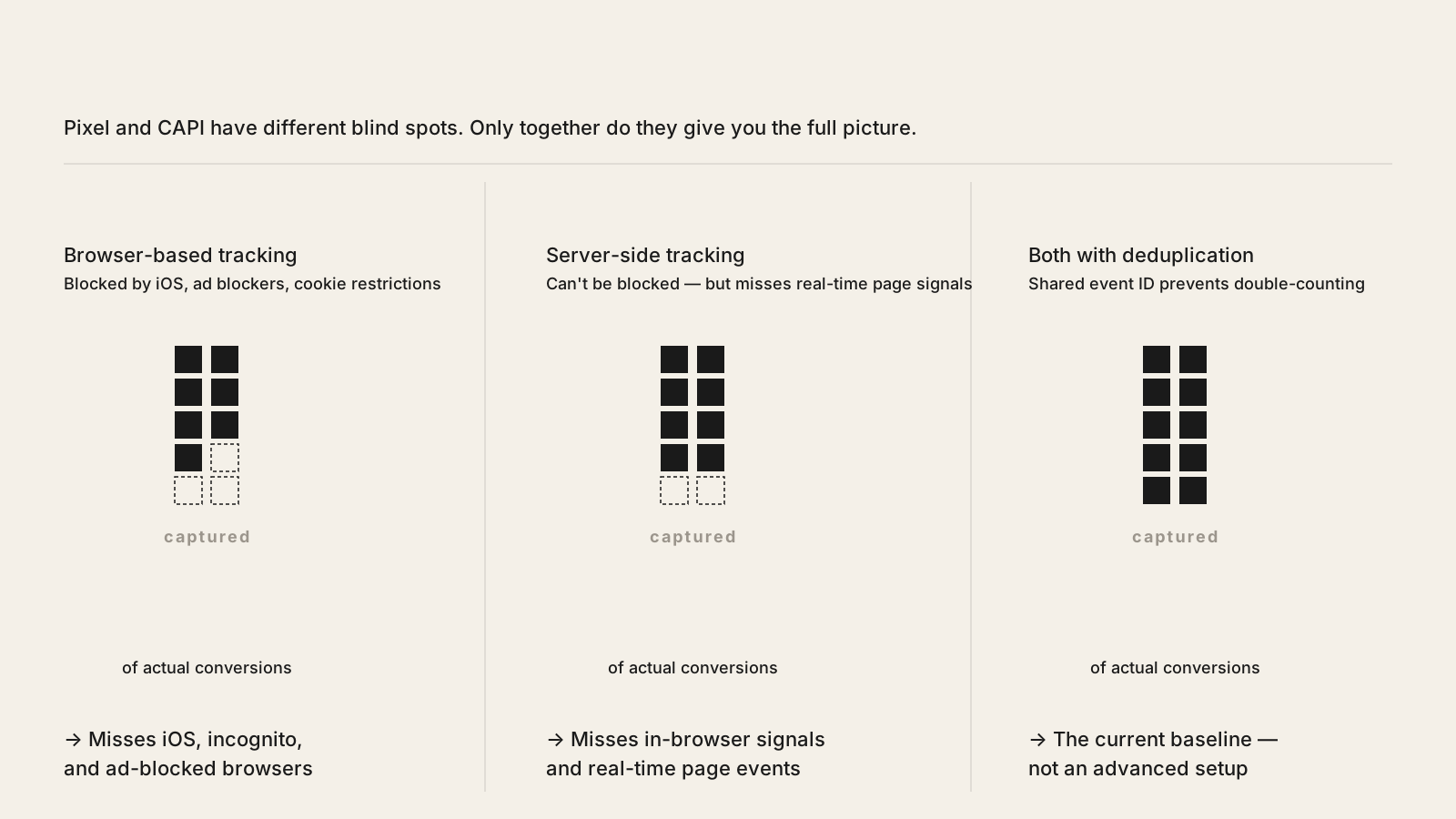
Browser-based tracking — the Meta Pixel, the Google tag — still works, but it works less well than it used to. iOS privacy changes, browser-level ad blockers, and cookie restrictions mean that a meaningful percentage of conversion events never reach the platform. Pixel-only setups routinely miss 20 to 40 percent of actual conversions depending on the audience and device mix.
The Conversions API on Meta and Enhanced Conversions on Google solve this by sending events server-side — directly from your server or CRM to the platform, bypassing the browser entirely. These events can't be blocked. They don't depend on cookies. Running both in parallel is the current standard, not an advanced configuration. The key requirement is deduplication: both systems need to send a shared event ID so the platform knows when a browser event and a server event refer to the same conversion and counts it only once. Without deduplication, you get overcounting. Without CAPI, you get undercounting. With both configured correctly, you get an accurate picture.
What to Actually Track
Having the infrastructure in place is half the job. The other half is deciding what to track — and this is where many setups go wrong in a more subtle way. The event being optimised needs to match the business outcome, not just be a measurable action on the page.
A few principles that matter in practice:
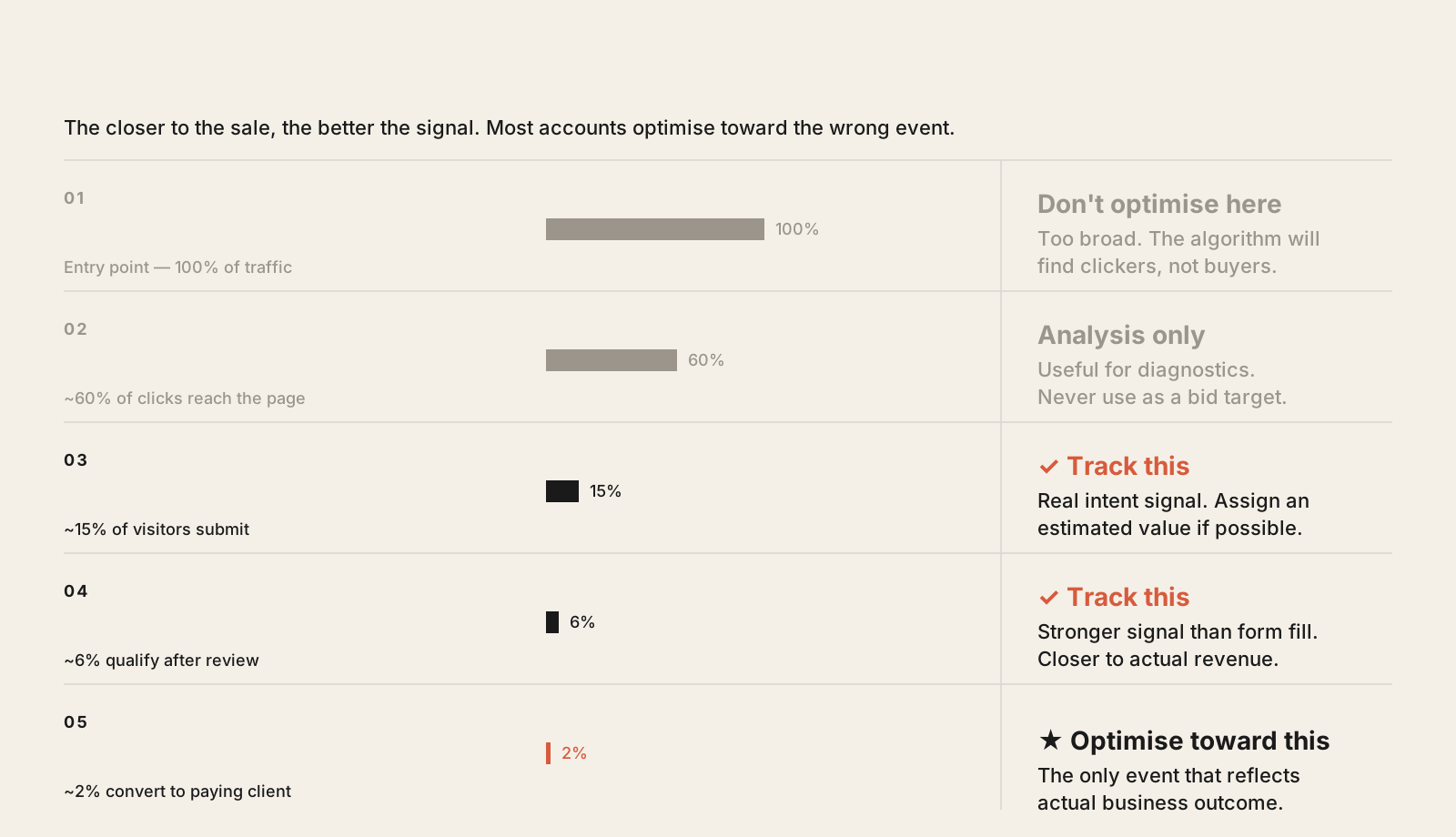
Track the event closest to revenue. Purchase for e-commerce. Qualified lead form submission for service businesses. A phone call of meaningful duration, not any call. The more downstream the event, the more signal the algorithm has to find people who actually convert.
Don't optimise toward micro-events at scale. Add-to-cart, page views, and video plays are useful for analysis but dangerous as primary optimisation targets. The algorithm will find people who add to cart — many of whom never buy.
Assign values where possible. Even estimated average order values attached to lead events give the bidding algorithm more to work with than binary conversion signals. On Google especially, value-based bidding outperforms conversion-count bidding once sufficient data is in place.
How to Audit What You Have
Running an audit on existing tracking doesn't require specialist tools. Meta's Events Manager shows you an Event Match Quality score — below 7 means the system is struggling to match your conversion events to real users, which directly slows the algorithm's optimisation. Google's Tag Assistant and the enhanced conversions report show whether server-side events are being received and matched correctly.
The practical checklist: check for duplicate events firing on the same page load, confirm your server-side integration is active and sending a matching event ID, pull your conversion report filtered by device and look for an unusually large gap between iOS and Android — this often indicates pixel drop-off that CAPI should be covering. And verify that the event your campaigns are bidding toward is the one closest to actual revenue, not just the one that was easiest to implement.
Accurate Data Is a Competitive Advantage
Most businesses running paid ads are optimising against imperfect data. Competitors who fix their tracking first — clean CAPI setup, proper deduplication, conversion events that map to real revenue — give their algorithms better signal. Better signal means better targeting, better bidding, and lower cost per actual customer over time.
Fixing tracking isn't glamorous work. It doesn't produce an immediate visible uplift the way a creative refresh might. But it's the foundation everything else is built on, and most accounts are building on sand without knowing it.